Institutional platform · frontend & backend
Ministerio Maná
One ministry. A clearer structure.
Design / Desktop & mobile
The work, on screen.



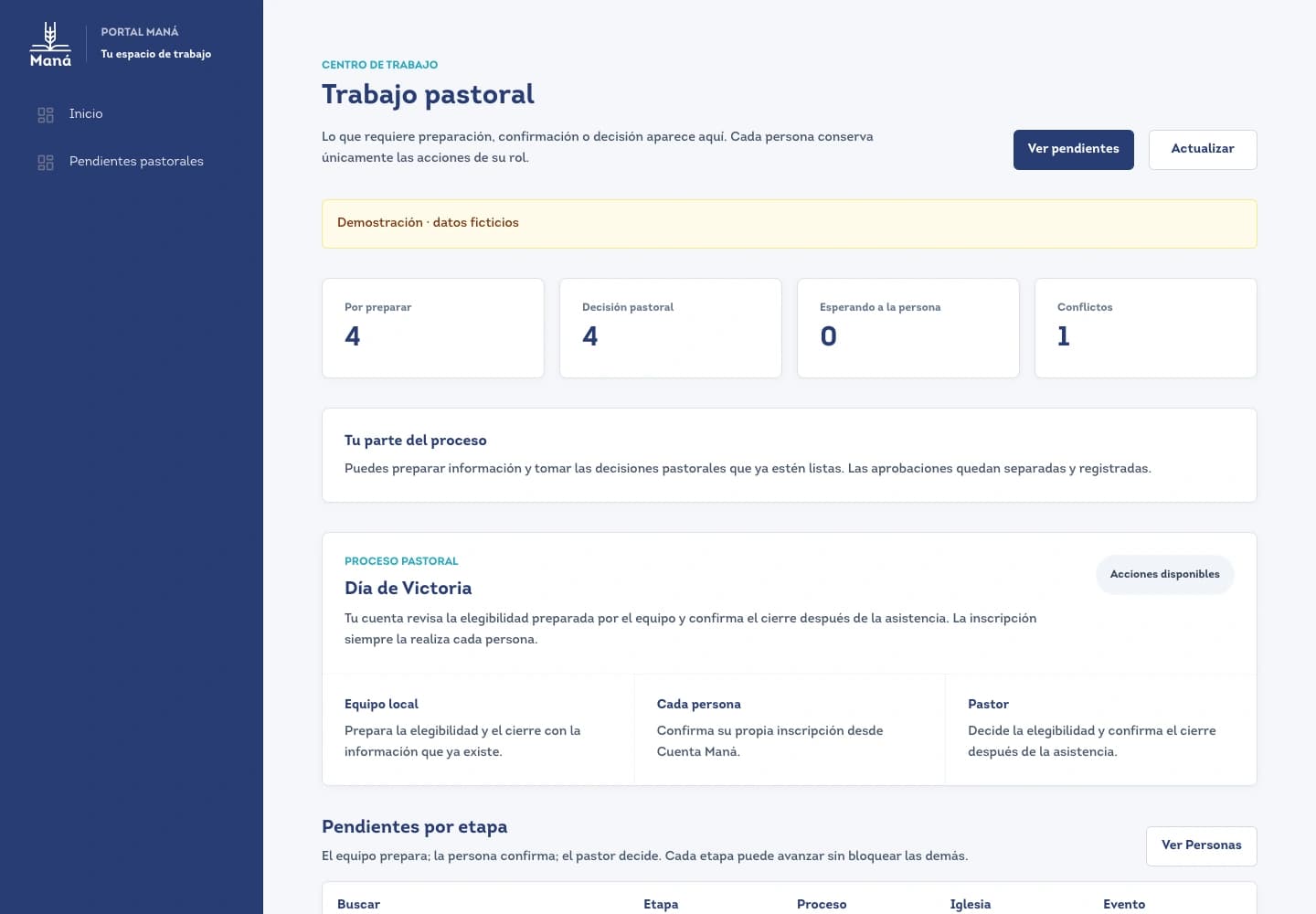
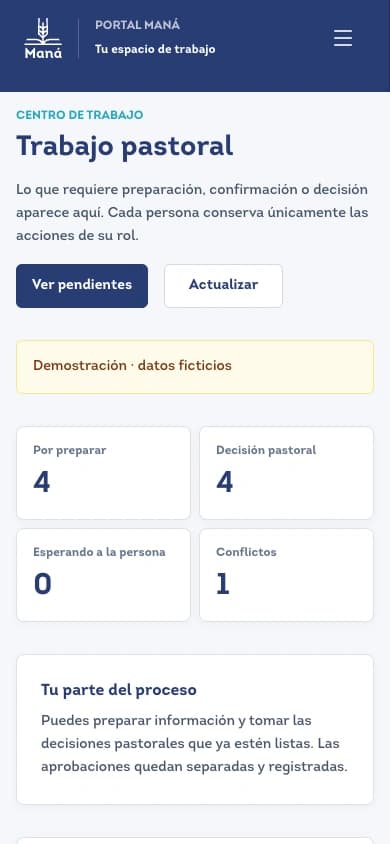
Existing team interface / fictitious data
The dashboard behind the public story.
Trabajo pastoral makes preparation, review, waiting and conflicts legible. It explains who prepares information, who confirms it and who makes the pastoral decision. This capture uses demonstration data, with fictitious tasks.
Same intention. A different screen.
01 / The idea
What this needed to solve.
Make the ministry easier to understand from outside and easier to organize from within. The public website introduces the institution; the portal gives each person and team a place to work.
An institutional story and an operational platform have different audiences. The work was to connect them through a clear information model, without showing internal records in the public experience.
02 / The process
How it took shape.
- 01
Reduce the noise
Reorganized purpose, history and areas of work into distinct chapters, reducing the elements competing for attention in each scene.
- 02
Make the origin visible
Built the London–Medellín map into the history chapter, using geography to explain the connection between the ministry’s origin and its community.
- 03
Structure the information
Separated identity, church relationships, participation and team responsibilities in the data model, then connected portal interfaces to server-side queries and permission checks.
- 04
Give each screen its rhythm
Composed the institutional story as scroll-led scenes on desktop and a vertical reading sequence on mobile, then documented the existing team interface with demonstration data.
Architecture / Behind the interface
The interface is only one layer.
The portal connects screens to server rules and a relational database. A request is checked against the person’s identity and responsibility before information is read or a change is processed.
- Frontend
A clear place to act
Public chapters, personal account and role-specific portal screens translate information into readable actions.
- Backend
Rules before a result
APIs check identity, scope and request data, then coordinate the workflow behind each screen.
- Data
Relationships, not a flat list
People, churches, participation and financial records have distinct responsibilities within the information model.
Interfaces and server modules are implemented in the project. These captures are demonstrations, not access to ministry records. External integrations and broader rollout have separate validation stages.
Modules and responsibilities
Open a module to follow its flow.
01 / People & responsibilitiesFrom a profile to a team workflow.Implemented in project
The account, church relationships and pastoral work interface are connected through scoped server operations.
- On screen
A person reviews their account; the team sees preparation, review and follow-up tasks.
- On the server
The API checks the session and allowed scope, and handles requests, import preparation or photo review.
- In the data model
Profiles, church relationships and workflow states remain distinct; private photos are separate from public content.
02 / ContentContent the team can manage.Implemented in project
Editorial screens and a content API give institutional sections a structured place beyond the page layout.
- Editorial interface
The team organizes sections and their content through the portal.
- Content API
Server operations handle authorized reading and updates to the section records.
- Public presentation
The website presents the institutional story from its content structure, separately from administrative screens.
03 / Participation & financeA visible status needs a source.Integration in review
Events, participation and financial reporting have interfaces and server modules; provider confirmations and rollout are a separate integration task.
- Participation
An event or account interface presents the registration and its state.
- Server workflow
Endpoints process participation, reservations and payment events under the relevant permissions.
- Records & services
Database records support reporting; Stripe and Wompi adapters handle external payment information when configured and validated.
Integrations
Supabase
Implemented in projectAccount, relational records and private media storage used by the portal.
Microsoft Graph / SharePoint
Integration in reviewAdapters for the team’s Microsoft resources; connection and rollout are reviewed independently.
Stripe / Wompi
Integration in reviewPayment-event and financial workflows in the project, without demonstrating a live transaction here.
Scope / Craft
My contribution.
What I worked on
- Communication & information architecture
- Frontend design & implementation
- Backend workflows & service integration
- Astro
- TypeScript
- Node.js
- Supabase / PostgreSQL
Built & designed
- A new institutional home organized into narrative chapters.
- A London–Medellín story map and desktop/mobile compositions.
- Portal interfaces, server workflows and a relational information model; the pastoral dashboard is shown with fictitious data.
The new home and expanded portal are in development. Interfaces and backend modules are built in the project; wider rollout and external integrations are reviewed separately by area.
Communication architecture, interface design and frontend/backend production within the Ministerio Maná team. Ministry content and assets belong to Ministerio Maná. Dashboard examples use fictitious data.